> ## Documentation Index
> Fetch the complete documentation index at: https://help.sundevs.net/llms.txt
> Use this file to discover all available pages before exploring further.
# Paste Viewer
> Read, share, download and embed a saved paste.
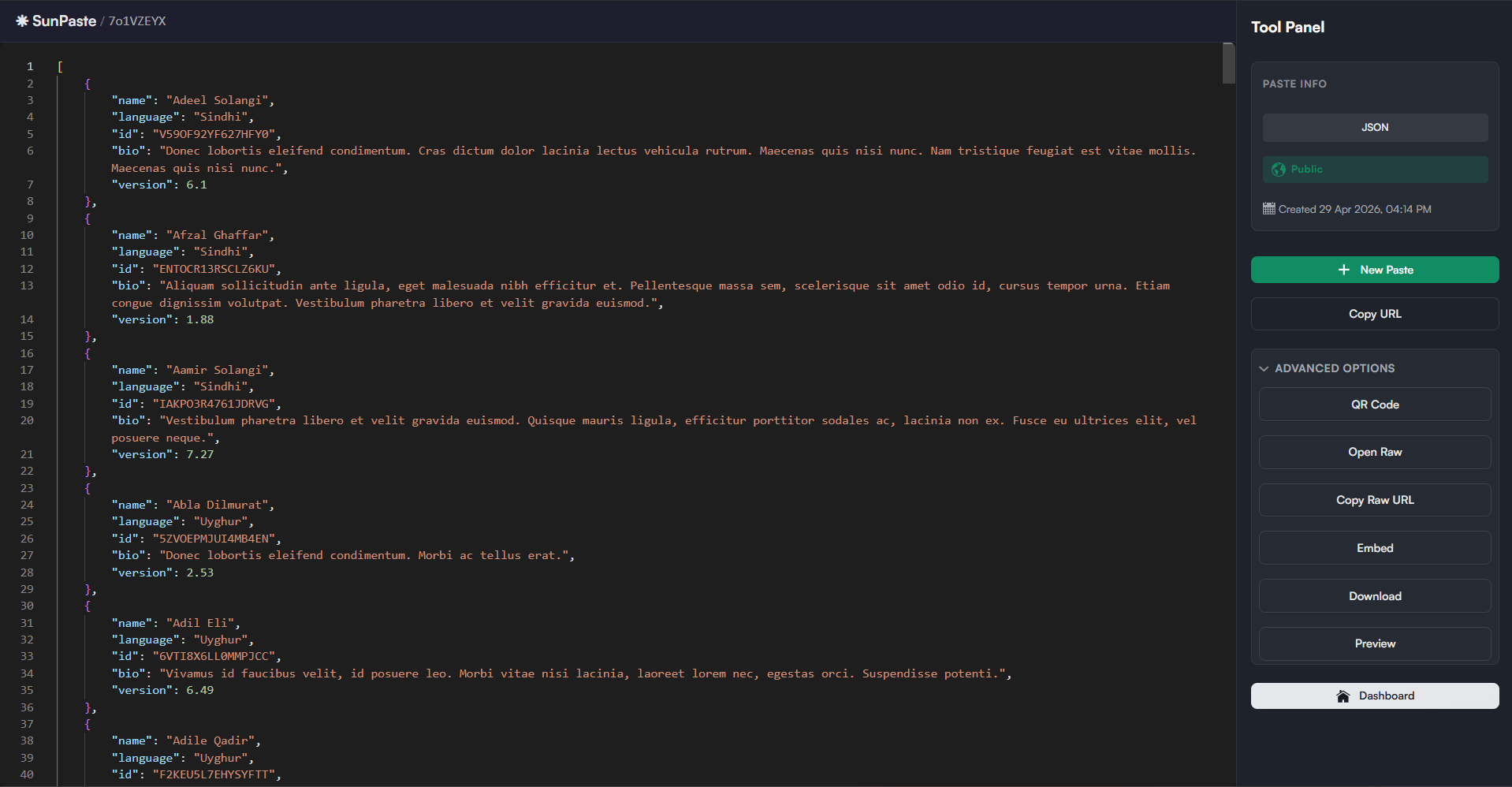
The viewer is the normal browser page for reading a saved paste. You can open it through either route; both load the same page:
* `/view/{slug}`
* `/api/v1/paste/{slug}`
 ## What you see
The viewer shows:
* A header with a home link and the paste slug
* The pasted content in a read-only, syntax-highlighted editor
* A right-side tool panel
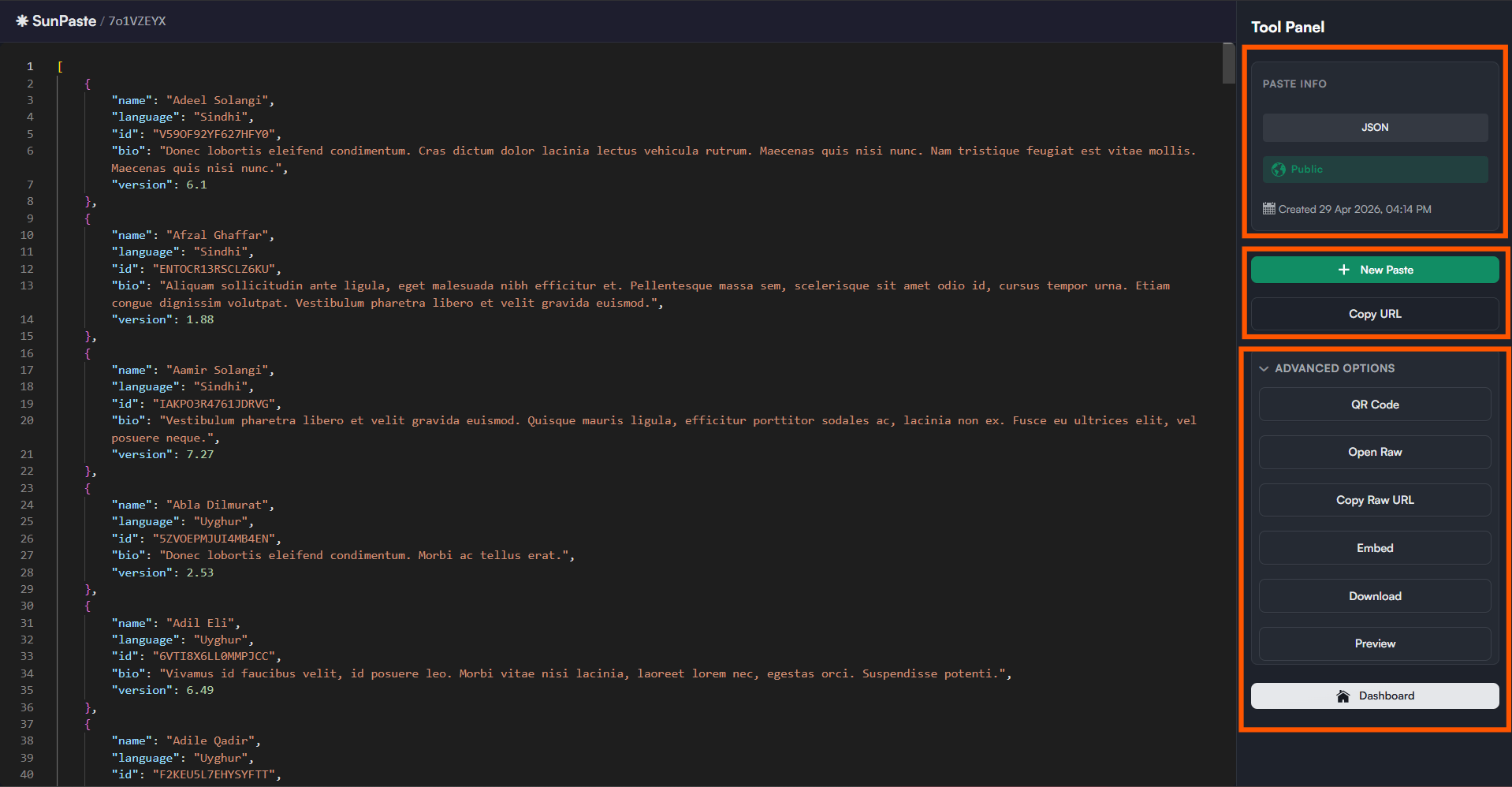
The tool panel includes a "Paste Info" card with:
* Language
* Visibility
* Creation time
* Burn-after-read badge when enabled
* Live expiration countdown when the paste has an expiration time
## Viewer actions
The tool panel includes `New Paste`, `Copy URL` and `Advanced Options`. The buttons inside `Advanced Options` depend on the paste:
* **Normal pastes:** `QR Code`, `Open Raw`, `Copy Raw URL`, `Embed`, `Download`, `Preview`
* **Password-protected pastes:** `QR Code`, `Preview` only. Raw, embed, and download are deliberately hidden.
If you are logged in, the viewer also shows `Dashboard`.
## What you see
The viewer shows:
* A header with a home link and the paste slug
* The pasted content in a read-only, syntax-highlighted editor
* A right-side tool panel
The tool panel includes a "Paste Info" card with:
* Language
* Visibility
* Creation time
* Burn-after-read badge when enabled
* Live expiration countdown when the paste has an expiration time
## Viewer actions
The tool panel includes `New Paste`, `Copy URL` and `Advanced Options`. The buttons inside `Advanced Options` depend on the paste:
* **Normal pastes:** `QR Code`, `Open Raw`, `Copy Raw URL`, `Embed`, `Download`, `Preview`
* **Password-protected pastes:** `QR Code`, `Preview` only. Raw, embed, and download are deliberately hidden.
If you are logged in, the viewer also shows `Dashboard`.
 | Action | What it does |
| ---------------- | -------------------------------------------------------------------------------------------------------------------------------------------------------------------------------- |
| **New Paste** | Takes you back to `/` to create a new paste. |
| **Copy URL** | Copies the current browser view URL. |
| **QR Code** | Opens a dialog with a QR preview and download buttons for `Small (200x200)`, `Medium (400x400)`, and `Large (800x800)`. |
| **Open Raw** | Opens the raw text endpoint `/api/v1/raw/{slug}` in a new tab. |
| **Copy Raw URL** | Copies the raw endpoint URL. |
| **Embed** | Shows an iframe snippet, a JavaScript widget snippet, and optional query parameters such as `theme`, `lines`, and `highlight`. Only available for non-password, non-burn pastes. |
| **Download** | Opens `/api/v1/export/{slug}` to download the paste as a file. Plain text by default, unless you add a `format` query parameter. |
| **Preview** | Toggles between highlighted source and preview mode (useful for Markdown, HTML, JSON, CSV). Disabled for pastes larger than about `512 KB`. |
## Special viewer states
* You see a password card instead of the content
* Entering the correct password unlocks the paste
* Entering the wrong password shows an inline error
* You first see a warning page telling you the paste will be destroyed after opening
* Clicking `View & Destroy This Paste` reveals the content and deletes it immediately afterward
* Once the burn completes, a banner tells you the paste has already been destroyed
* The viewer shows an expired message
* The raw and API endpoints return `410 Gone`
* The viewer shows a "Private Paste" message with `Log in to view` and `Create a new paste`
* Only the paste owner or an admin can open a private paste
If playground private mode is enabled and the paste is not private:
* Anonymous visitors cannot open the shared view link
* The viewer shows a "Login Required" page
* After login, SunPaste redirects you back to the requested paste when possible
If the slug does not exist, the viewer shows a "Paste Not Found" page.
## Large pastes
Large non-burn pastes are streamed from the raw endpoint, which avoids loading everything through the normal initial render path.
Large burn-after-read pastes are loaded server-side first, then burned, so the content still displays correctly on the last view.
## Related topics
- [SunPaste](/sunpaste/overview.md)
- [API & Sharing Endpoints](/sunpaste/reference/api-and-sharing.md)
- [Home / Playground](/sunpaste/core-concepts/home-page.md)
- [Settings](/sunpaste/admin/settings.md)
- [Core Concepts](/sunpaste/core-concepts.md)
| Action | What it does |
| ---------------- | -------------------------------------------------------------------------------------------------------------------------------------------------------------------------------- |
| **New Paste** | Takes you back to `/` to create a new paste. |
| **Copy URL** | Copies the current browser view URL. |
| **QR Code** | Opens a dialog with a QR preview and download buttons for `Small (200x200)`, `Medium (400x400)`, and `Large (800x800)`. |
| **Open Raw** | Opens the raw text endpoint `/api/v1/raw/{slug}` in a new tab. |
| **Copy Raw URL** | Copies the raw endpoint URL. |
| **Embed** | Shows an iframe snippet, a JavaScript widget snippet, and optional query parameters such as `theme`, `lines`, and `highlight`. Only available for non-password, non-burn pastes. |
| **Download** | Opens `/api/v1/export/{slug}` to download the paste as a file. Plain text by default, unless you add a `format` query parameter. |
| **Preview** | Toggles between highlighted source and preview mode (useful for Markdown, HTML, JSON, CSV). Disabled for pastes larger than about `512 KB`. |
## Special viewer states
* You see a password card instead of the content
* Entering the correct password unlocks the paste
* Entering the wrong password shows an inline error
* You first see a warning page telling you the paste will be destroyed after opening
* Clicking `View & Destroy This Paste` reveals the content and deletes it immediately afterward
* Once the burn completes, a banner tells you the paste has already been destroyed
* The viewer shows an expired message
* The raw and API endpoints return `410 Gone`
* The viewer shows a "Private Paste" message with `Log in to view` and `Create a new paste`
* Only the paste owner or an admin can open a private paste
If playground private mode is enabled and the paste is not private:
* Anonymous visitors cannot open the shared view link
* The viewer shows a "Login Required" page
* After login, SunPaste redirects you back to the requested paste when possible
If the slug does not exist, the viewer shows a "Paste Not Found" page.
## Large pastes
Large non-burn pastes are streamed from the raw endpoint, which avoids loading everything through the normal initial render path.
Large burn-after-read pastes are loaded server-side first, then burned, so the content still displays correctly on the last view.
## Related topics
- [SunPaste](/sunpaste/overview.md)
- [API & Sharing Endpoints](/sunpaste/reference/api-and-sharing.md)
- [Home / Playground](/sunpaste/core-concepts/home-page.md)
- [Settings](/sunpaste/admin/settings.md)
- [Core Concepts](/sunpaste/core-concepts.md)